↵
Revised: Variable "PUM2024_RevisionDate" is not defined
Reviewing Customer Item Activity
Overview
The Revenue Processor reviews customer item activity at the beginning of each month. A report of pending items in collection status is sent to the Attorney General’s Office (AGO) for third-party customers that are 45 days past due, or to OBM State Accounting (OBM) for customers that are state agencies and are 30 days past due. AGO/OBM State Accounting certifies the pending items and begins the collection process.
When reviewing a customer's item activity, a search pulls up a page with two high-level tabs, the Item Activity tab and the Direct Journal tab. The Direct Journal tab displays deposit, payment, and Journal ID information for miscellaneous revenue. Direct journals, however, are not the focus of this procedure. The Item Activity tab is good for reviewing the aud it trail of a particular transaction. The audit trail can be used to review the associated worksheets, etc.
Steps

- Verify or enter the agency specified Business Unit into the
SetID
field.
- Enter the Customer ID in the
Customer
field.
- To search for items from a specific date range, enter the appropriate dates in the
Acctg Date From
and an
Acctg Date To
fields.
- If a date range is not specified, all activity is shown.
- Click
Search.
- The Item Activity page displays all entries (posted items, payments, and memos) in the specified date range. Debits and credits are shown as separate items in this list, rather than being listed as net amounts.
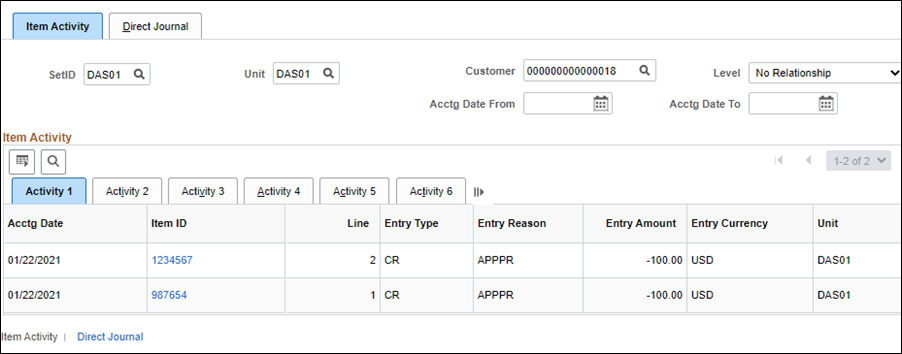
- Click the
Item ID
column header to sort the list in a way that groups related items (i.e., payments with their receivables).
- Click an
Item ID
link to view more detailed information.
- The Item Maintenance page displays.
- Review the tabs located on the Item Maintenance page as desired.
-

-
- The
Detail 1
tab provides accounting, payment details and status for each item.
- The
Customer Relations
section of the Detail 1 tab provides a quick means of capturing information about disputes and collections. If a customer disputes a charge for an item, the Customer Relations section is used to indicate:
- That the item is being disputed (Dispute check box
- The reason for the dispute (Reason field)
- The date the dispute was identified (Date field)
- The amount in dispute (Dispute Amount field)
- Placing an item in dispute allows those items to be separated when reviewing the customer balance information. When the dispute is resolved, the
Dispute
check box is deselected.
- The Detail 1 tab is also used to document any conversation with the customer regarding the dispute and its resolution.
- Refer to the Placing Items In Dispute and Placing Items In Collection for more information on using this section.
- Detail 2 and Detail 3 Tabs
-
- The
Detail 2 and Detail 3
tabs are not used by the State.
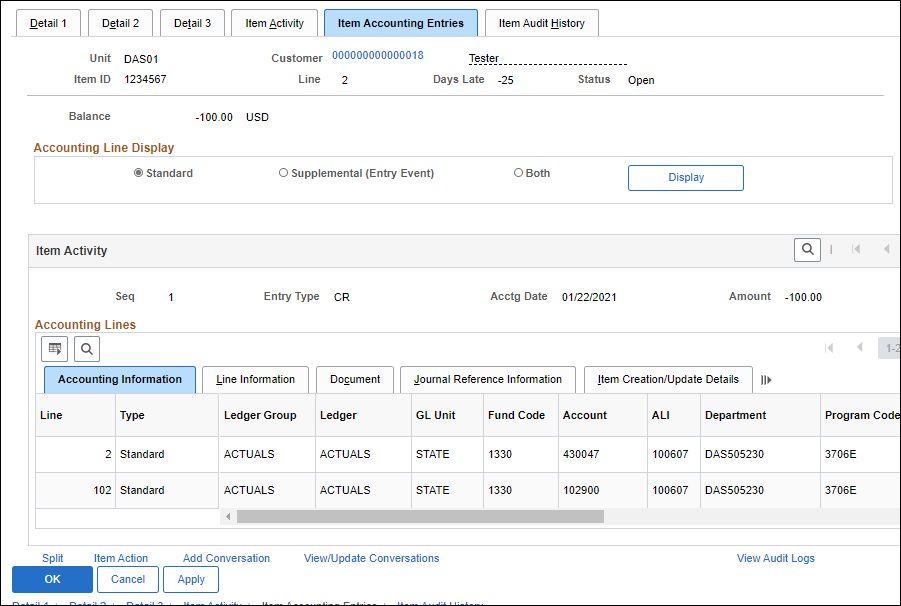
- Item Accounting Entries Tab.
-
- The
Item Accounting Entries
tab allows the originally recorded accounting entries (ChartFields) to be reviewed.
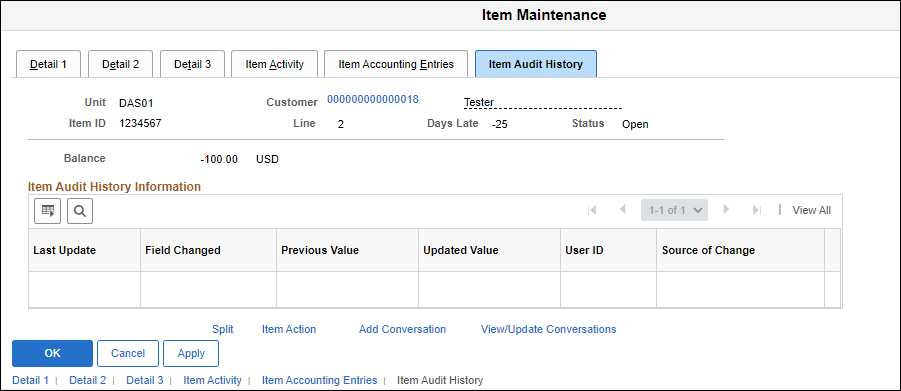
- Item Audit History Tab.
-
- The
Item Audit History
tab provides a list of all changes made to an item. For each field, OAKS FIN shows when the change was made, by whom, and what the changes were.
- Click
OK
to return to the Item Activity tab or click
Cancel
to return without saving any changes.
