Error Messages Related to CC Ledgers
Expenditure Transaction Errors
When entering an expenditure transaction the user may receive one of two error messages that relate to the Commitment Control Ledgers:
- “Exceeds Budget Tolerance” refers to an insufficient budget. There is not sufficient budget (or possibly cash) for that particular ledger and ChartField combination.
- “No Budget Exists” refers to a ChartField combination that has not been created (that is, loaded into OAKS with the other budget line items).
Budget Journal Errors
A Budget Journal cannot post if the Budget Header Status shows an Error exists. What Commitment Control Ledger is affected will also display.
- “Security Error” relates to not having been assigned the OAKS FIN security role necessary to perform a process.
- " Error" relates to budget check and/or ChartFields including but not limited to:
- "Budget Journal with Error"
- "Combo Edit Error"
- "Child Exceeds Parent" (Allotment is greater than Appropriation)
- "Exceeds Budget Tolerance"

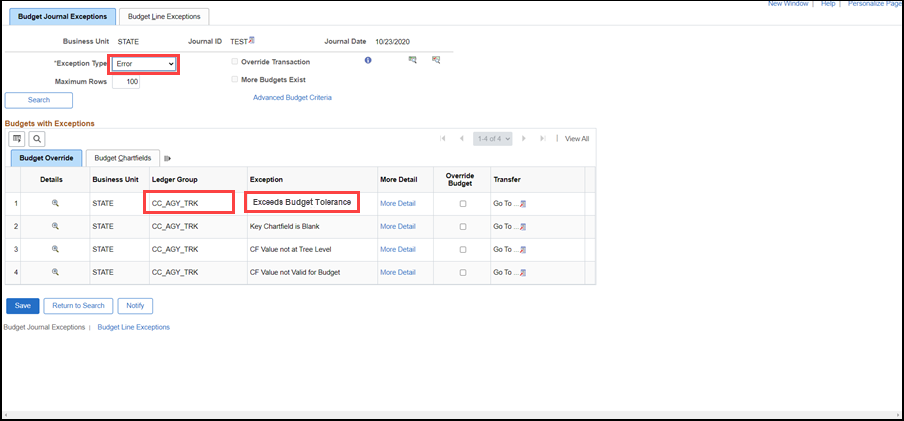
View Budget Journals with errors and the ledger groups that failed budget check
Security Error

Error

"Error" displays in the Budget Header Status field because this budget journal was entered with the account at the wrong level of the department track tree (COM701900 is the transaction level value while the budget level value is COM700000).
When an error message displays, click on the Budget Header Status Error link to view error details and which Commitment Control ledger group(s) is (are) impacted.
- The Budget Journal Exception page displays.
- The exception is listed as "CF Value not at Tree Level."

In this example, "Error" displays in the Budget Header Status field because the Program value was not entered.
When an error message displays, click on the Budget Header Status Error link to view error details and which Commitment Control ledger group(s) is (are) impacted.
- The Budget Journal Exception page displays.
- The exception is listed as "Key ChartField is Blank."

- This journal for agency control has all the correct ChartFields coded but the dollar amount will reduce the available budget below $0.00.
- "‘Error" shows at the Budget Header Status.
- When an error message displays, click on the Budget Header Status Error link to view error details and which Commitment Control ledger group(s) is (are) impacted.
- The Budget Journal Exception page displays.
- The exception is listed as "Exceeds Budget Tolerance."