Reviewing Fund Activity |
Revised: 07/19/2024 |
Users review the 507.A.Fund Cash Balance Summary form to ensure agency-owned funds have a projected positive cash balance. The 505.A.Fund Activity Detail form shows revenues, transfers, and expenses for a specific fund.
If a fund has a projected negative cash balance, the agency must modify revenue and/or expenses using the 121.E.Budget Data Collection - Expense or 121.T.Budget Data Collection - Revenue and Transfers forms.
If an agency does not own a fund, these forms do not apply for the agency.
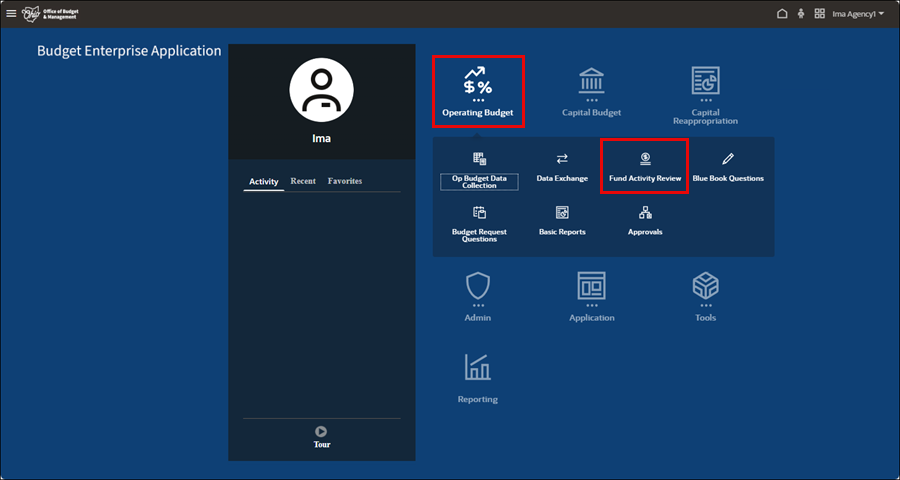
- Select the Operating Budget tile.
- Select the Fund Activity Review icon.
- The 507.A.Fund Cash Balance Summary form displays.

- A red highlighted cell indicates a negative cash balance.

- Highlight the fund with a left-click to ensure the whole row is highlighted, to review a specific fund's activity.
- Right-click on the fund and select Fund Activity Detail from the pop-up menu.
- The 505.A.Fund Activity Detail form displays.

- This form is read-only and displays the beginning cash amounts, revenues, transfers, and expenses. It is the primary way to determine why a fund's cash balance is negative.

- Left-click to highlight the form, then right-click in the upper left-hand cell to open the menu.
- Select Expense Updates or Revenue and Transfer Updates from the pop-up menu.
- Depending on the selection, either the 121.E.Budget Data Collection-Expense or the 121.T.Budget Data Collection-Revenue and Transfers form displays. The screenshots below are using the 121.E.Budget Data Collection-Expense form.

- Adjust any revenue and or expense amounts so that the fund's ending balance in all three years (FY 2025, FY 2026, and FY 2027), is positive.
- Refer to the Operating Budget Data Collection Card job aid for instructions on adjusting amounts.
- Return to the 507.A.Fund Cash Balance Summary form after adjusting amounts and saving on the Operating Budget Data Collection forms, to validate that the fund balance is positive in all three years.
